app.virtconsole.com/kubernetes/clusters/prod/services
Apply a Service of type LoadBalancer and a real platform load balancer appears with a public IP within a couple of minutes. Everything is driven by annotations.
apiVersion: v1
kind: Service
metadata:
  name: webapp
  annotations:
    service.beta.kubernetes.io/managed-loadbalancer-plan: std-2g
    service.beta.kubernetes.io/managed-loadbalancer-backend-protocol: http
    service.beta.kubernetes.io/managed-loadbalancer-ssl-mode: letsencrypt
    service.beta.kubernetes.io/managed-loadbalancer-ssl-domain: app.example.com
spec:
  type: LoadBalancer
  selector:
    app: webapp
  ports:
  - port: 443
targetPort: 8080One annotation set controls plan, protocol, TLS and access.
Pick the LB plan and backend protocol per Service. The LB deploys from the plans your region actually sells.
ssl-mode letsencrypt with your domain issues and renews the certificate automatically. Custom and inline certificates are supported too.
Source range filtering, security groups, PROXY protocol, and public or VPC-only exposure.
Not everything should have a public IP.
Annotate a Service as internal and it receives a private VIP inside the VPC. The cloud controller reports the private address back to the cluster.
Pin a Service to an allocated public IP with the managed-loadbalancer-public-ip annotation.
Plaintext HTTP stays plaintext under global SSL mode, so redirects and ACME challenges behave.
The pool follows the cluster, not the other way around.
Scaled-in and scaled-out workers appear in the LB pool within seconds, including during plan rotations.
Active and passive health checks configurable via annotation. NodePort backends are checked over TCP.
The Kubernetes bridge updates the same certificate row in place on every reconcile instead of minting duplicates.
Scaled-in and scaled-out workers appear here automatically, on the same cluster page that shows control plane status and pools.
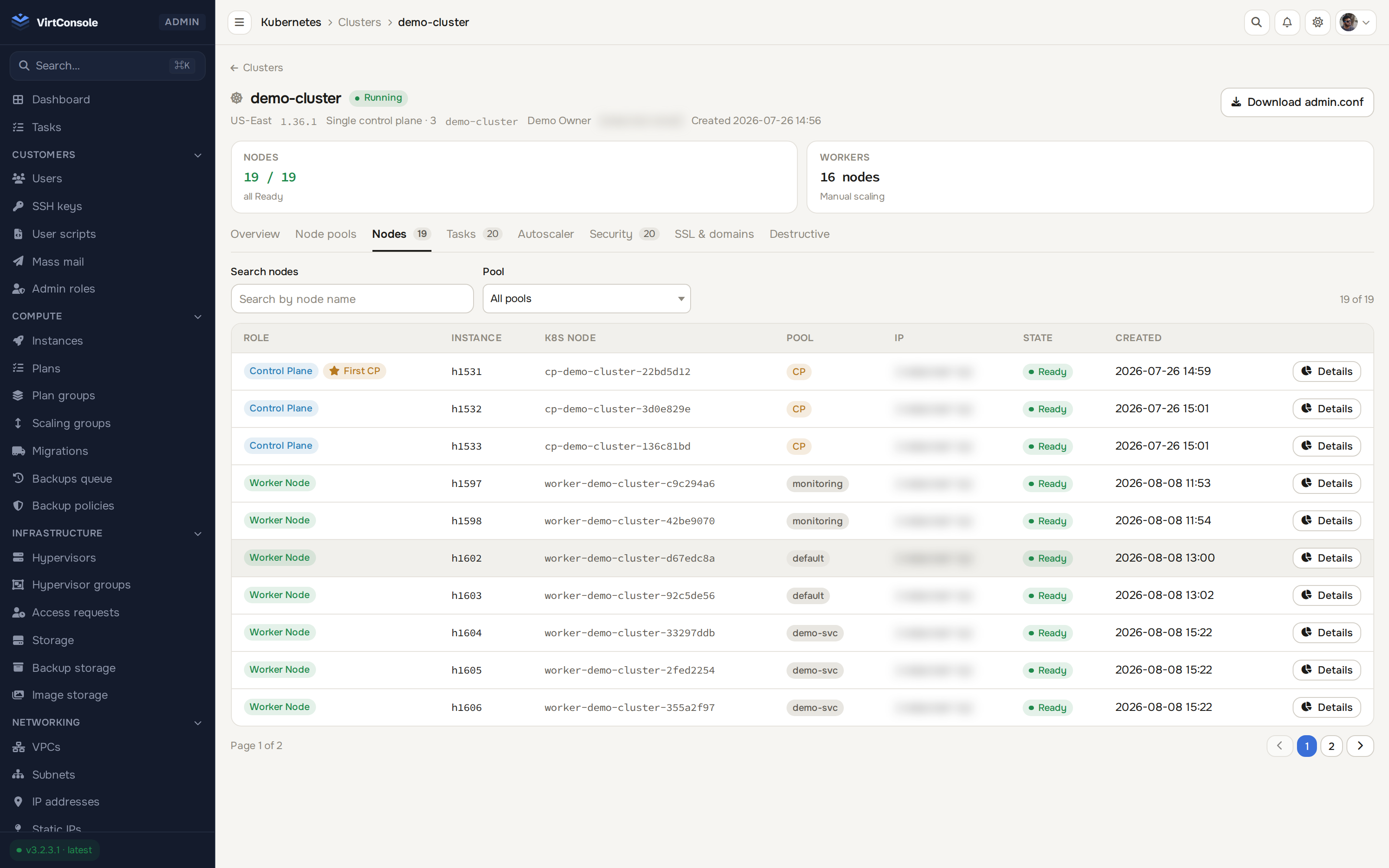
The cluster whose workers this LoadBalancer Service tracks
Free 30-day trial. Every feature included. No credit card required.
30 days, every feature, no credit card, VirtConsole installs with the trial active by default. Just run the installer on your own hardware.
Debian 11/12/13 · Ubuntu 22.04/24.04/26.04 · Rocky / Alma / CentOS Stream 9/10 · run as root.