app.virtconsole.com/storage
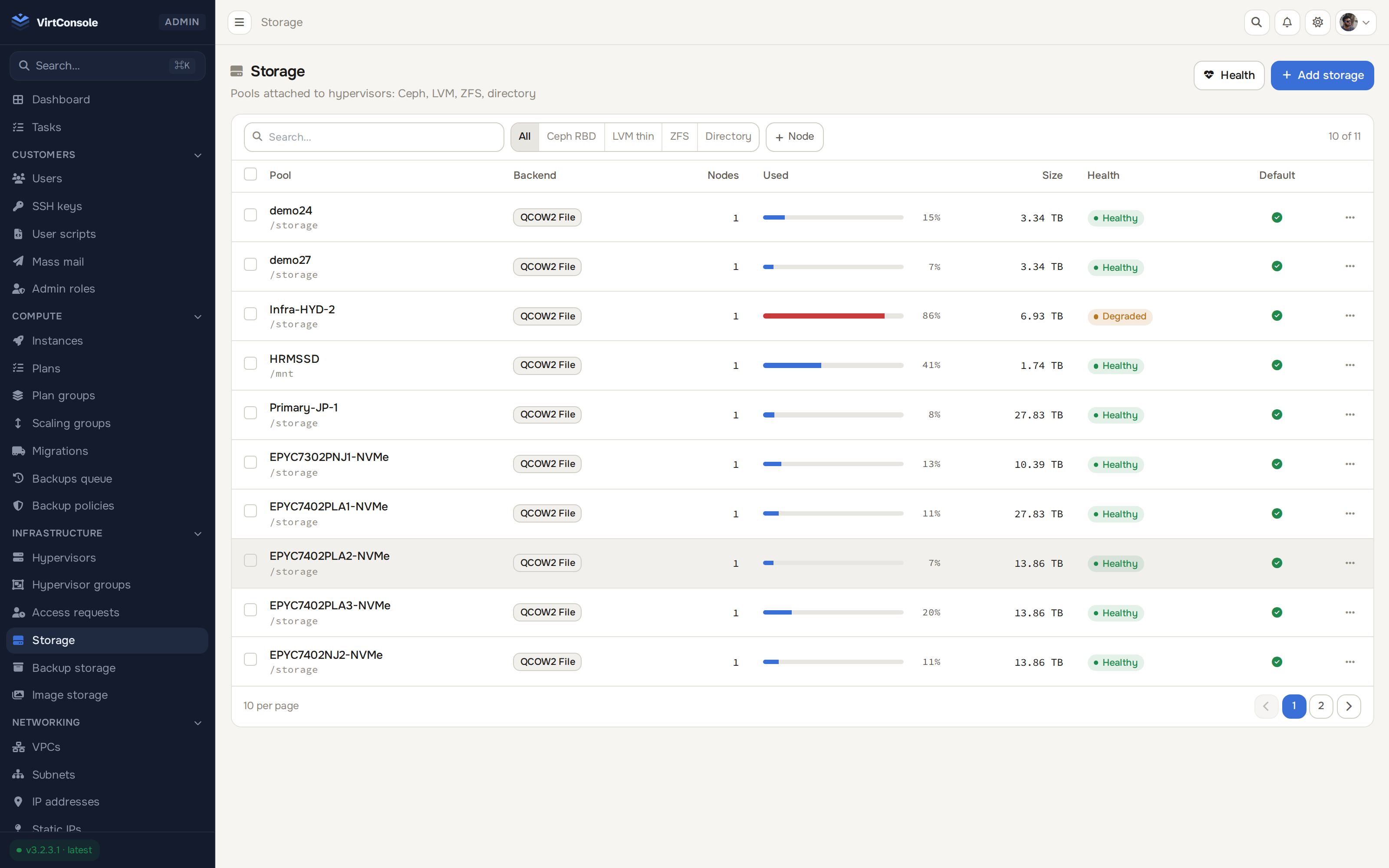
Ceph, LVM, ZFS, QCOW2, NFS and Proxmox-native storage onboard through a single guided wizard. A 30-second collapse watchdog pauses only the at-risk instances before a thin pool corrupts a disk.
Sell differentiated storage tiers from a single hypervisor.
Ceph RBD, LVM thin and thick, ZFS thin and thick, QCOW2, NFS and Proxmox-native. Thin variants over-provision; ZFS brings checksumming and compression.
A five-step wizard probes the hypervisor live before anything is saved: tooling verified, pool existence checked, real capacity reported.
HDD, SAS, SSD and NVMe classes per hypervisor, with per-plan read/write IOPS and bandwidth limits.
Thin provisioning’s dark side is pool exhaustion. Two layers of defense ship by default.
Every hypervisor watches its pools every 30 seconds. Approaching exhaustion pauses only the at-risk instances before disks corrupt, and mails every admin.
Paused instances keep RAM and disk state. Fix the pool, resume from where they stopped.
Live data and metadata usage, ZFS pool state and fragmentation, fed by the same probes the watchdog uses.
Streaming, incremental, and verified.
Backups stream directly to S3, SFTP, FTP or any rclone remote with zero local staging.
Sparse QCOW2 incrementals via QEMU dirty bitmaps, across all backends including raw block devices.
Automated schedules with retention pruning, failure alerting that always sends, and auto-pause for repeatedly failing plans.
One PBS destination for both hypervisor types, with real deduplication and a restore that outlives the source instance.
Back up plain KVM hypervisors and Proxmox VE nodes to the same Proxmox Backup Server destination from one panel, under the same policies, schedules and retention rules.
Reads only the blocks changed since the last backup, and every backup lands in a PBS datastore that deduplicates chunks across every instance stored there. Each snapshot carries a server-verified integrity state, checked independently of any restore.
Destroying an instance keeps its backups by default, and a protected backup is never deleted. Restore in place or into a brand-new instance, even from an already-deleted source, with billing that follows automatically. Customers back up and restore their own instances from the panel.
A backup posture your admins set once at the location, not one every customer configures for themselves.
A hypervisor group carries a default backup policy that every new instance inherits automatically the moment it deploys there, no per-instance setup required.
Backups run under a per-node throttle, so a scheduled backup wave never competes with customer I/O for the whole storage pool at once.
Every hypervisor writes a nightly configuration bundle to its backup storage. If the node dies, pick a replacement and the platform restores each instance from its latest backup chain, re-homes networking, and reports progress as a task.
Block volumes with real recovery paths, and S3 your customers self-serve.
Instant on-storage rollback marks and full DR exports, with in-place or restore-to-new-volume modes.
MinIO-based S3-compatible buckets: self-service creation, access keys, bandwidth tracking, quotas and hourly billing. Works with any S3 client.
Restores verify the staged artifact and use tmp-then-rename, so a partial download can never replace a disk.
Scheduled and manual backups across instances, with status, size and retention visible at a glance.
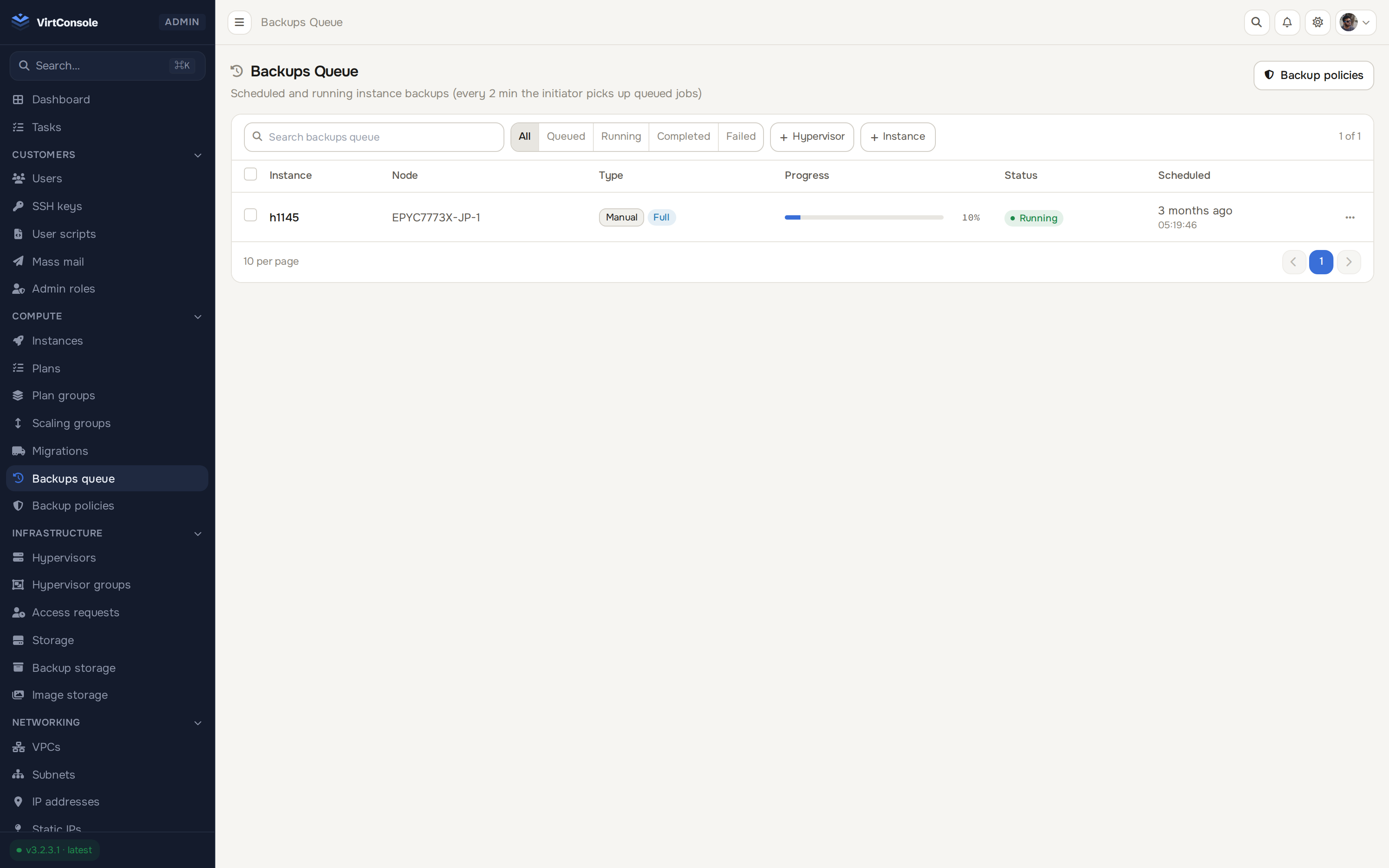
Backups across the fleet: status, size and retention in one list
Free 30-day trial. Every feature included. No credit card required.
30 days, every feature, no credit card, VirtConsole installs with the trial active by default. Just run the installer on your own hardware.
Debian 11/12/13 · Ubuntu 22.04/24.04/26.04 · Rocky / Alma / CentOS Stream 9/10 · run as root.